Published on May 12, 2026 (Updated on May 13, 2026)

More than 500 new charging ports are now accessible through the ChargeHub app.

Thanks to a new integration with Saascharge, a charging station management provider with charging options across Canada and the United States, EV drivers can now activate sessions and pay directly in the ChargeHub app on more than ten new charging networks.


500+ New Ports, One App

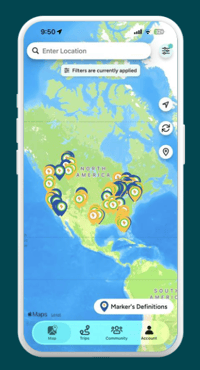
13 new networks on the chargehub ev mapThis integration makes over 500 charging ports compatible with ChargeHub, spanning more than 8 U.S. states and 3 Canadian provinces. You'll find them on the ChargeHub map alongside 160,000+ charging ports from 40+ compatible networks throughout North America.

Every new network integrated with ChargeHub means one less app to download and one less account to create. More than one million EV drivers have used ChargeHub to find charging stations and pay for their charging sessions.

To stay informed about upcoming network integrations, subscribe to the ChargeHub newsletter.

Which New Networks Can You Activate Through ChargeHub?

EV drivers now have more places to charge and can activate sessions and pay directly in the ChargeHub app on more than ten new charging networks. As with every other station on the ChargeHub map, availability updates in real time, so you'll know if a port is free before you head out.

The 13 new networks compatible with ChargeHub:

  • aether EV
  • Americharge
  • Astra X Charge
  • Espen
  • ESD-Global
  • EVCAN
  • EVBOLT
  • Evcoh
  • EVlution
  • Hwisel
  • Integra
  • Jus Charging
  • Karga

Charging with ChargeHub on the New Compatible Networks

Steps to charge with ChargeHub:

  1. Open the ChargeHub app
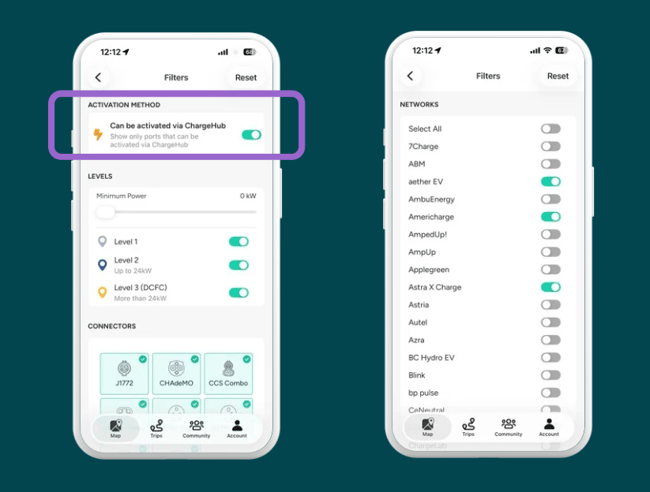
  2. Narrow your search with filters: connector type, charging speed, charging network

💡 Tip! Use the filter to display only stations compatible with ChargeHub.

ChargeHub filters

  1. Select the station that fits your needs
  2. Start your session directly from the app

ChargeHub handles the session from start to finish, whatever the network. Find it. Start it. Pay for it. All in one place.

💡 Resource: Check out our guide to get the most out of the app.

About the New Networks you Can Now Activate

These 10 networks serve EV drivers in communities and destinations across Canada and the United States. Some operate within a single province or state; others span multiple regions. Together, they add over 500 ports to your ChargeHub map.

In Canada

  • aether EV: British Columbia, 10+ ports
  • Astra X Charge: Ontario, 20+ ports
  • EVCAN: Ontario, 15+ ports
  • EVlution: multiple provinces, 50+ ports
  • Hwisel: Ontario, 30+ ports

In the United States

  • Americharge: New York, 40+ ports
  • Evcoh: Michigan, 5+ ports
  • ESD-Global: New York, 15+ ports
  • Espen: California, 100+ ports
  • EVBOLT: Florida
  • Integra: New York
  • Jus Charging: deployed across 10 states, from Florida to Mississippi, 130+ ports
  • Karga: New York, 10+ ports

Frequently Asked Questions

Can I charge my EV on these 13 networks with ChargeHub: aether EV, Americharge, Astra X Charge, Espen, ESD-Global, EVCAN, EVBOLT, Evcoh, EVlution, Hwisel, Integra, Jus Charging, Karga?

Yes. The stations are now accessible through the ChargeHub app. Find them on the ChargeHub map, check real-time availability, and start a session directly from the app; no separate account or activation card required.

Where are the stations on these new networks located?

They're spread across 8 U.S. states (Florida, Tennessee, New York, Michigan, Illinois, Texas, Colorado, California) and 3 Canadian provinces (Ontario, Alberta, British Columbia). Open the ChargeHub app and search your area to see the stations available near you.

Do I need a separate account to charge on these new networks?

No additional account is needed. ChargeHub handles the charging session for you, from start-up to payment. You use the ChargeHub app exactly as you usually do, regardless of which network you're charging on.

How many new charging ports does this integration make accessible on ChargeHub?

This integration brings more than 500 charging ports onto ChargeHub, across Canada and the United States.

How do I find these new stations on the ChargeHub map?

Open the ChargeHub app and search by location. These stations are already visible on the map. Filter by connector type or charging speed to find the one that fits your EV.

Does ChargeHub show real-time availability for these stations?

Yes. These stations display real-time availability in ChargeHub, just like every other station on the network. Check the app before you leave to know whether a port will be free when you arrive.