 FIND A STATION
 STORE
STORE






 Get the app



If you no longer wish to use ChargeHub, you can delete your account directly from the app.
Important: Before deleting your account, request a refund if you have any funds remaining. Once your account is deleted, you will no longer be able to access your balance.
How to delete your ChargeHub account
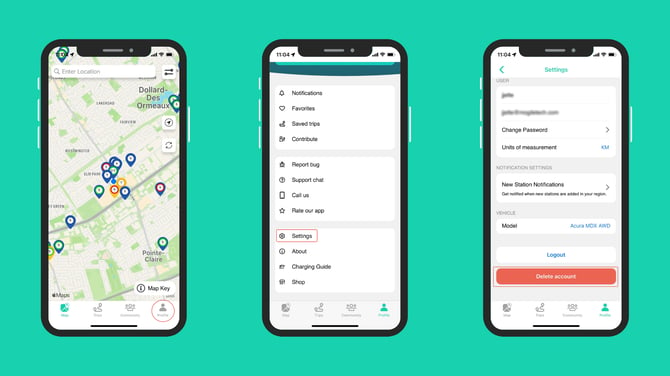
- Open the ChargeHub app and tap the Profile tab in the bottom-left corner of the screen.
- Scroll down and select Settings.
- Tap Delete account and follow the on-screen instructions to confirm.
Once your account is deleted, your personal data and account information will no longer be accessible.