 FIND A STATION
 STORE
STORE







 Get the app




Adding funds to your ChargeHub Wallet lets you start charging seamlessly at compatible public charging stations with the ChargeHub app.
*Note: You must have a ChargeHub account to add funds. If you require assistance, take a look at our guide on creating a ChargeHub account*
1. Open the ChargeHub application
Launch the ChargeHub application on your device.
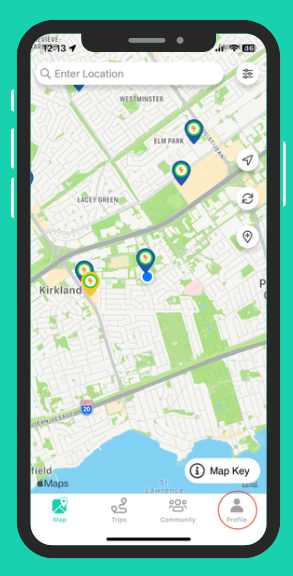
2. Go to the Profile tab
Tap the Profile icon located at the bottom right of the screen.
3. Manage your ChargeHub Wallet
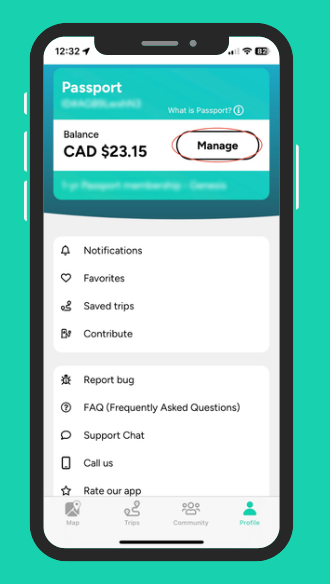
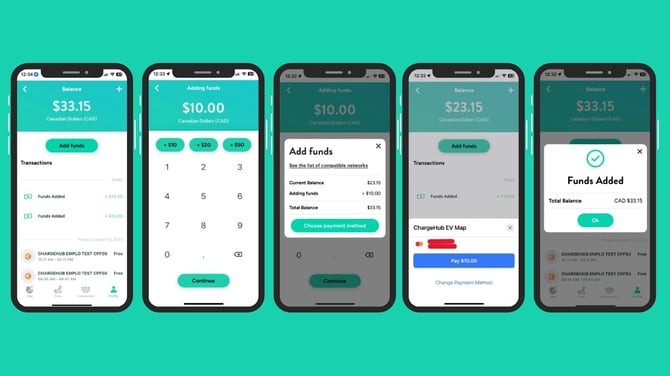
In the Account tab, tap the Add Funds button to access your ChargeHub Wallet.
4. Add funds
The Profile page shows your current wallet balance and recent transactions.
- Select a predefined amount or enter a custom amount.
- Enter your credit card details.
- Funds will be added to your wallet.
Important notes:
- Minimum amount: $10
- Maximum amount: $10,000
- Accepted cards: Visa, Mastercard, and Canadian-issued American Express


