Published on January 09, 2026 (Updated on January 09, 2026)

You drive an electric vehicle (EV), and you want to recharge quickly during your trips. You might be planning a long drive or a short round trip, and knowing how to find a fast-charging station can significantly improve your experience on the road.

Charging is more than a technical step. It is a key moment in your journey. In this guide, you will learn how to identify the best fast chargers, choose those compatible with your vehicle, and avoid unpleasant surprises.


Why You Should Plan your Charging Stops Before Leaving

Planning your charging stops before you hit the road saves time and reduces stress. Public charging stations are becoming more common, but their power levels, connectors, and prices can vary widely.

A Level 2 charger takes several hours to charge your car. A Level 3 fast charger uses direct current and usually brings your battery to 80% in 20 to 40 minutes, depending on your model and battery temperature.

You still need to choose the right station. The charger must support fast charging for your vehicle and meet your requirements for power, connector, network, and location.

Planning your stops with an app like ChargeHub helps you save time and drive with peace of mind.

The Tools You Need to Find a Fast Charging Station

Icon showing multiple location pins connected to a charging station symbol, illustrating the search for nearby fast EV chargers.

The easiest way to locate a fast charger is to use a dedicated EV app. These tools show you in real time where chargers are located, their power level, pricing, and reviews from other EV drivers.

1. The ChargeHub mobile app

With the ChargeHub app, you get access to the most complete charging map in Canada and the United States. You can:

  • filter stations by power (50 kW to 350 kW)
  • check real-time availability
  • view comments and ratings from other EV drivers
  • plan a full trip with optimized charging stops

In seconds, you know exactly where to plug in and how long the stop will take.

2. Google Maps and in-car systems

Google Maps now offers a “fast charging” filter that highlights high-power stations along your route. Many electric vehicles display compatible chargers directly on the dashboard using the vehicle’s connected app.

3. Public networks and their maps

Networks such as FLO, Electrify Canada, Petro Canada, and ChargePoint offer their own interactive maps. They show power levels, pricing, availability, and nearby services such as coffee shops, restrooms, and restaurants.

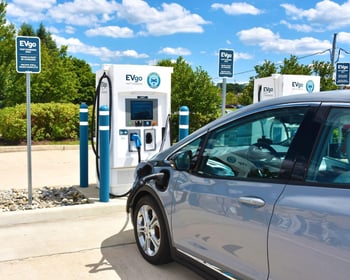
Fast charging stations in a parking lot

The Criteria That Help You Choose the Right Fast Charger

Not all fast chargers offer the same experience. Before leaving, check a few important details to make sure you choose the best option.

Connector compatibility

EVs use different connector types, including CCS, CHAdeMO, and NACS, which is the Tesla standard.
If you are using a charger for the first time, check your vehicle manual or your mobile app to make sure the connector works with your car.

Charging power

Charging speed depends on the charger power. A 50 kW charger is slower than a 150 kW or 350 kW charger. Some vehicles also limit the charging speed they can accept, so choosing the highest power charger does not always mean a faster session.

Availability and reliability

Choose charging stations with multiple fast chargers. This reduces the risk of waiting if one charger is busy or offline. Reviews on the ChargeHub app can also help you judge the reliability of the location.

Location and amenitiesElectric car charging at a fast charger.

A good charging station also means a convenient location with easy access and nice surroundings. Chargers near restaurants, malls, or coffee shops help you use your time efficiently during the session.

Pricing

Prices vary depending on the network and the region. Some stations charge by the minute, while others charge per kilowatt hour. The ChargeHub app lets you compare all prices before leaving.

Steps to Locate and Reach a Fast Charging Station

Finding the right charger is one thing. Getting there efficiently is another. Follow these steps to plan your stops smartly.

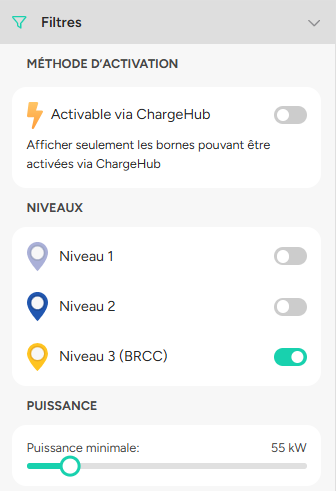
ChargeHub app filters for fast charging stations

1. Plan your route

Before leaving, open the ChargeHub app and enter your destination. The app suggests the most efficient fast-charging stops based on your vehicle’s range.

2. Filter by power and compatibility

Use the “fast charging” or “DC fast charging” filters to display only stations that meet your vehicle’s requirements.

3. Check station details

Before your trip, review:

  • The number of chargers available
  • Maximum charging power
  • Connector type
  • Access hours and possible fees

4. Arrive ready to plug in

Battery temperature affects charging speed. In winter, drive a few minutes before stopping so the battery warms up and charges more efficiently.

In summer, if you have been driving for a long time and the battery feels hot, let the car cool down briefly. A battery that is too warm can also slow down fast charging.

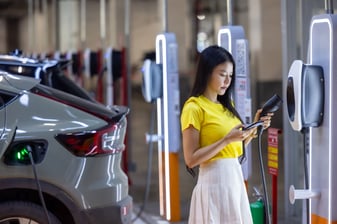
Electric car driver using the ChargeHub app while charging her vehicle.

Tips and Tricks to Find a Charger Quickly

Even with great tools, a few habits make your search even easier.

• Use your favourites in the ChargeHub app to save your preferred stations
• Turn on notifications when available to get alerts when a charger becomes free
• Pay attention to weather conditions because battery temperature affects charge speed
• Keep a Plan B in rural areas by identifying a Level 2 charger nearby
• Read your owner’s manual for optimal charging recommendations

Common Mistakes to Avoid

Even experienced EV drivers make mistakes when searching for a charger. Here are the most common ones to avoid.

• Choosing a charger with the wrong connector
• Using an outdated app
• Arriving at the charger with a battery that is too hot or almost full
• Forgetting to check pricing or access hours
• Not planning an alternative station in case of outage

The Key Role of the ChargeHub App

Our mobile app was created to simplify every EV driver’s life. With one tool, you can

  • Locate fast charging stations in Canada and the United States
  • Check power levels, compatibility, and real-time availability
  • Plan stops based on your vehicle’s range
  • Pay for certain sessions directly in the app
  • Share reviews and photos with the community

ChargeHub becomes your ideal copilot to find fast charging stations quickly and easily.

FAQ: Your Questions About Finding Fast Chargers

What is the difference between a fast charger and a Level 2 charger?

A Level 2 charger takes four to eight hours to fill your battery. A fast charger usually reaches 80%  in 20 to 40 minutes using direct current.

How do I know if my vehicle is compatible?

Check the connector type in your owner’s manual or in your EV’s mobile app. CCS and NACS are the most common standards in Canada.

Are fast chargers always paid?

Most fast chargers cost money, but some networks offer free sessions to members. You can check all pricing directly in the ChargeHub app.

What is the charging speed?

Charging speed depends on station power and your vehicle model. In general, a 150 kW fast charger adds about 150 kilometres, or about 90 miles, of range in 15 minutes, depending on your battery settings.

Find Your Next Fast Charger with ChargeHub

Finding a fast charging station has never been easier. With the right tools and a few simple habits, you can plan your trips without stress and make the most of your time on the road.

With the ChargeHub mobile app, you can find available chargers, compare prices, filter by power level, and plug in with confidence.

Join thousands of EV drivers who charge faster, easier, and smarter.